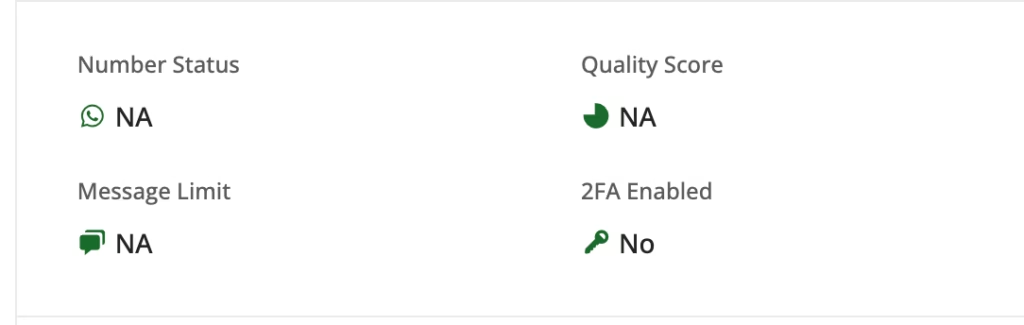
Sudden Change in WhatsApp Number Status to NA #
If your WhatsApp number status has changed to NA after previously functioning correctly, there are two primary reasons to consider:
- Deletion of the Number: This could mean that the WhatsApp number has been deleted from WA Manager.
- Account Ban for Policy Violation: If your account or number is banned, it reflects a policy violation which requires an appeal to Meta for resolution.
you’ll need to follow these steps to diagnose and resolve the issue: #
- Access WhatsApp Manager:
- Tap on the WhatsApp icon.
- Select “WA Manager”. This action redirects you to the WhatsApp Manager where you can identify the issue at hand or visit https://business.facebook.com/wa/manage
- Identify the Issue and Take Action:
- If the account shows no number,it means number is deleted and now you need to permanently disable the channel and create a new WhatsApp channel for same number Register a New Number
- If the account or number is banned due to a policy violation, an appeal needs to be made to Meta.
Agent Instructions: Querying This Documentation #
If you need additional information that is not directly available in this page, you can query the documentation dynamically by asking a question.
Perform an HTTP GET request on the current page URL with the ask query parameter:
GET https://helpdocumentation.gitbook.io/user/common-error-issues/troubleshooting-whatsapp-api-errors/whatsapp-number-status-shows-na.md?ask=<question>The question should be specific, self-contained, and written in natural language.
The response will contain a direct answer to the question and relevant excerpts and sources from the documentation.
Use this mechanism when the answer is not explicitly present in the current page, you need clarification or additional context, or you want to retrieve related documentation sections.